The calculator adds the estimates on each side of an offer. It does not measure a player’s honesty, calculate cash profit or prove the game will allow a trade. This guide follows the actual controls on the trading tools page.
Select items and type
- Click Add item to has for an item you give, or Add item to wants for one you receive.
- Search for the exact name. Use the category filter if you need a stored gamepass rather than a fruit.
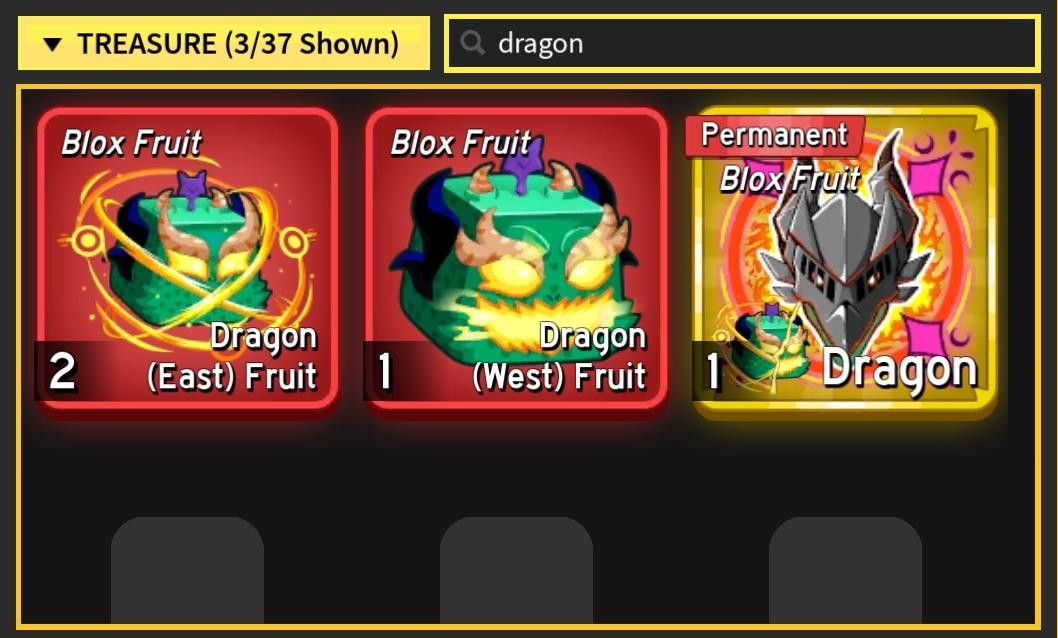
- Select the item. For Dragon, select East or West separately.
- Choose Physical fruit or Permanent fruit where applicable. The observed source does not quote permanent-fruit values, so switching to Permanent leaves a blank field.
- Enter a positive estimate for every selected item, using the same units. You can select up to four items on each side.
The initial physical numbers come from the source and date displayed on the tool. Editing a field changes your calculation; it does not change the source’s published estimate.
Reproduce three results
These are hypothetical input examples, not recorded trades or market quotes.
| Has total | Wants total | Difference | Percentage of Has | Numerical result |
|---|---|---|---|---|
| 100 | 100 | 0 | 0% | Fair, equal totals |
| 100 | 125 | +25 | +25% | Higher received estimate |
| 100 | 75 | −25 | −25% | Lower received estimate |
The formula is (Wants − Has) ÷ Has × 100. If you reverse a 100-for-125 example, the result becomes (100 − 125) ÷ 125 = −20%, not −25%. The number you give is the denominator.
Unknown and invalid values
A blank, zero, negative or invalid estimate makes the offer incomplete. The tool does not pretend that an unknown permanent value is free, and it does not silently replace an invalid custom entry with a snapshot number. Complete the missing field or remove the item.
A stored gamepass is its own item type; it is not a physical/permanent fruit pair. Do not add Robux purchase prices to community trade-estimate units. They describe different things.
Recover without losing the task
Use Remove on one item to clear its slot. Search text and category filters apply together in the selection dialog. Close or Escape returns to the offer; Clear both offers resets the entire comparison. No Roblox login or inventory access is needed.
What the result cannot establish
Equal totals do not guarantee equal demand. A positive difference is not a guarantee of a completed sale or profit. The source snapshot is not a live feed, and we have no accuracy percentage or completed-sales sample to publish. Read the source and limits, inspect the actual trade window, and use the safety checklist before accepting an offer.